District View
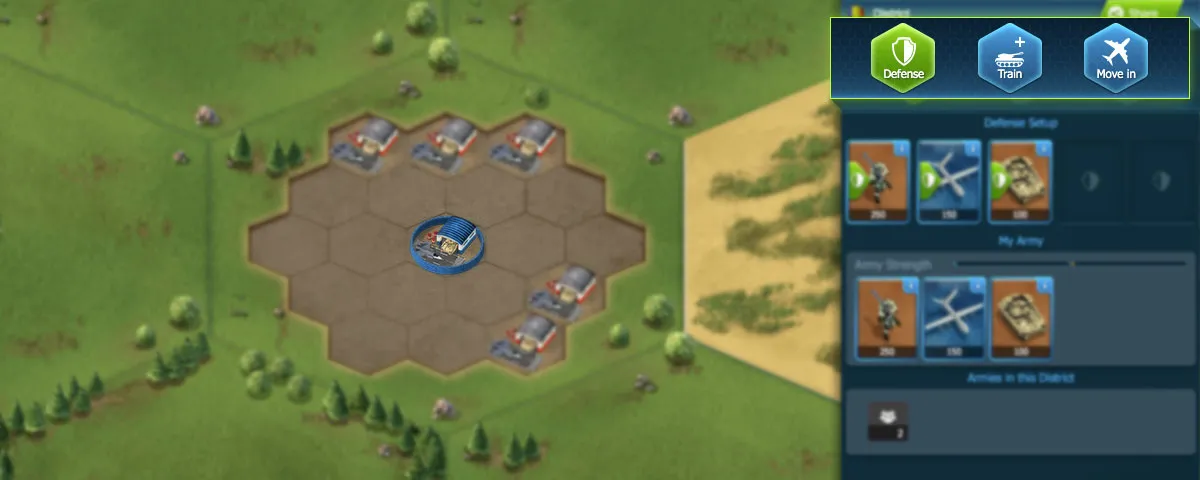
The District View is your tactical command center, showing detailed information about bases, armies, and recent battles within a specific district.
District Sidebar
When you open a district, a sidebar appears with all essential information:
Action Buttons
| Button | Function |
|---|---|
| Manage Defense | Configure your defensive setup (if you have units in the district) |
| Train Units | Access unit training options |
| Move In | Select units from anywhere to move to this district |
Information Displayed
- Your Defense Setup - Current defensive configuration
- Your Army - Units you have stationed here
- Enemy Units - Visible enemy positions (targetable)
- Other Armies - Battalion members and guerilla forces
- Base Information - Hover tooltips showing base types
- Recent Battles - Last 5 battles in the past 2 hours
District Types
Guerrilla Districts
The majority of the world map consists of Guerrilla districts:
- Produce and deploy Air and Land units
- Standard combat rules apply
- Can contain all base types
Coastal Districts
Guerrilla districts located next to water:
- All Guerrilla features plus Navy unit production
- Strategic for naval-focused players
- Often key defensive positions
Capital Districts
Special districts accessible only during Capital Warfare:
- Fixed number of Capital Bases
- Requires battalion membership to attack
- Primary objective for competitive play
Scouting Enemy Positions
Enemy units positioned in districts are now visible, allowing you to:
- Plan strategic attacks - Identify weaknesses in enemy defenses
- Choose appropriate forces - Match your composition to counter theirs
- Target high-value bases - Use tooltips to identify resource-rich targets
Attack Rate Limiting
District attacks use a strategic timing system:
| Rule | Details |
|---|---|
| Attack Limit | 3 attacks per player per district per 12 hours |
| District-Specific | Limits are per district, not global |
| Countdown Timer | Shows when you can attack again |
This prevents overwhelming individual players while allowing multi-front conflicts.
Live Battle Monitoring
Keep the District Sidebar open to watch battles unfold in real-time. This helps you:
- Track battalion operations
- Monitor enemy activity
- Time your own attacks strategically
Related Guides
- Map Overview - Understanding the map system
- Base View - Interacting with specific bases
- Battle Rules - Combat mechanics
- Unit Movement - Moving units into districts
⚠️ In case of any discrepancies, the in-game information in World War Online is the authoritative source of truth.